A couple of weeks ago I first shared details about a TUI I was working on called Monocle. Monocle was built to review the code your AI agent produces, but what I was most excited about was how I was using (abusing?) the brand new MCP channels to make the experience seamless. Unfortunately, in my excitement I failed to make a compelling case for why you should care about this tool. And by leading with MCP channels, which are a Claude Code-only feature in research preview, I accidentally made Monocle seem like a Claude Code-only tool.
Monocle now integrates with any AI coding agent that supports MCP tools or agent skills, with official support for Claude Code, OpenAI Codex, Gemini CLI, and OpenCode. The MCP channel integration is still there as a nice-to-have for Claude Code users, but it's no longer the whole story.
Today I'm hoping to do a better job convincing you that Monocle is the tool you didn't know you were missing.
The Problem
So what is Monocle, and why should you care about it? Monocle helps you actually review all the stuff your coding agents produce. We all talk a big game about "human in the loop," but it turns out that's easier said than done. In my experience moving from fancy autocomplete to fully agentic software engineering, your options realistically end up being:
1. Block every change before it's written. This is the Cursor-style approach to development. You read and approve every change before the agent writes it to disk. Sounds safe in theory, but in practice it just nags you constantly to the point where you start accepting changes without reading them. It also demands your constant attention. If you step away from your desk, no work gets done, which defeats a lot of the purpose of moving to an agentic workflow in the first place.
2. Review the changes using git locally. There are tons of great diff-viewing tools out there and this feels solid at first glance. But the moment you want to give feedback on a change, you have to jump back to your agent and describe the code you want changed, hoping it finds the right spot. If you're really diligent you include file and line number references, looking them up yourself manually. And that's just for one change. Do you keep trying to build up a mega-prompt with everything you want fixed? Or send feedback one item at a time and watch your agent trip over itself (and burn tokens) as you give potentially conflicting review?
3. Review the changes using GitHub Pull Requests. Here you get the great combination of a diff viewer with the ability to comment on specific lines across all changed files, building up a single review you can submit all at once. But the review cycle is slow. You (or your agent) have to commit and push code before it can even be reviewed. Once you do review, your feedback isn't actively read by your agent: you have to ask it to go fetch those comments from the PR using the GitHub API before it can begin addressing them. It's enough friction that you probably end up abandoning the process after a few cycles.
All of these options frustrated me. What I realized I wanted was essentially GitHub's PR review interface, but for files locally on my machine, with a direct connection to the coding agent. I wanted to build up a review, commenting on multiple files and making all my suggestions at once, and then send it off to the agent who would instantly pick it up and begin making fixes with exact file references, line numbers, and highlighted code examples. Then when it was done I'd see the new changes as diffs, rinse and repeat, all immediately on my machine.
This is exactly the flow Monocle is built for.
Plan Review
But it goes further than source code. The files in your project workspace aren't the only content your agent generates. Agents work best and produce the best outcomes when you spend time up front in the planning phase, working together on a plan of attack and architecture document. But since these plans aren't usually written to disk in your repo, you're forced to review them in the agent's UI, where you run into the same referencing problems.
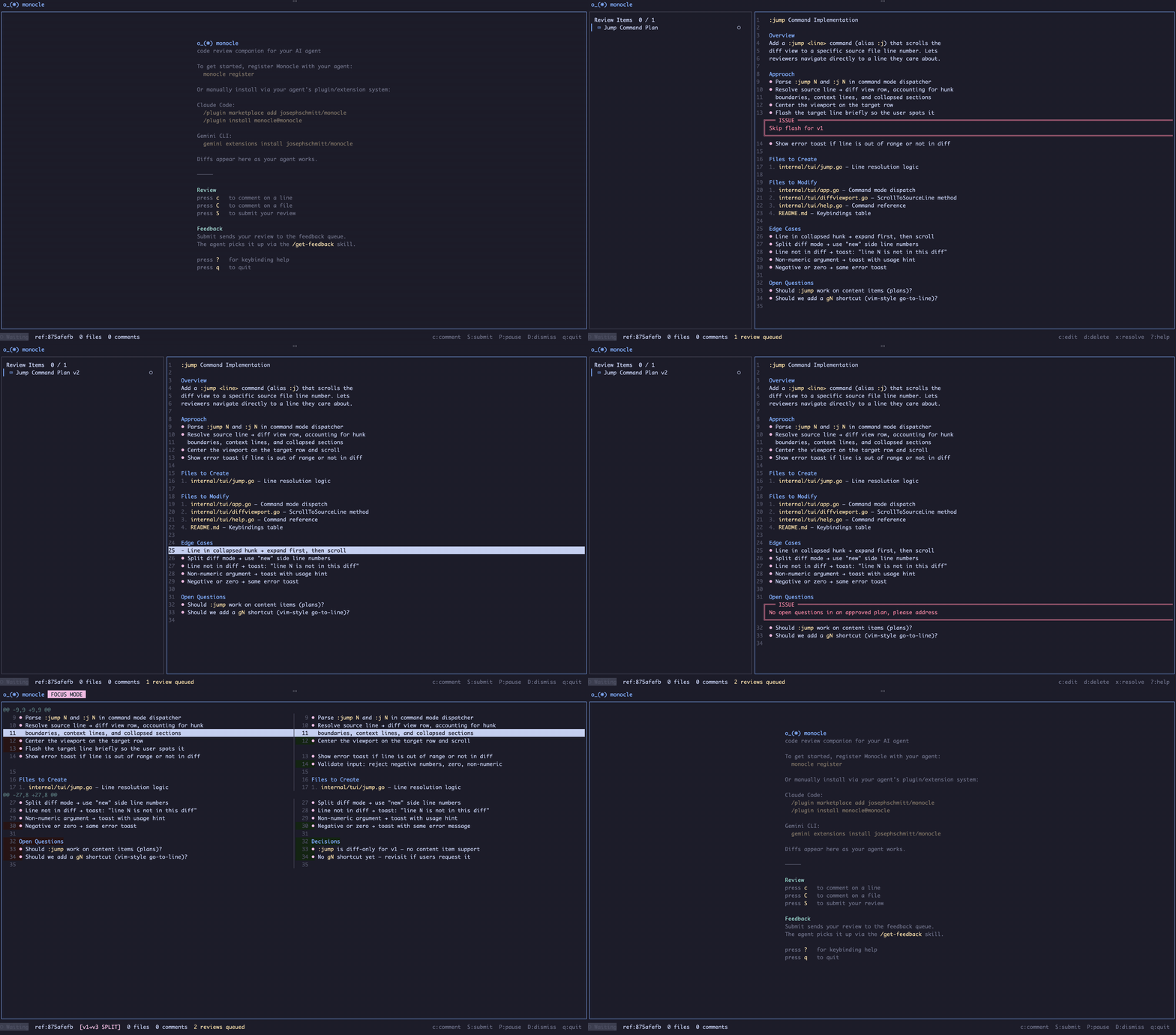
Monocle supports AI-generated content like plan files natively. You can comment on specific lines or sections of a plan and send that feedback over for review. And when a new version of the same plan comes back to Monocle for further review, it renders as a diff against the previous version, making it easy to see exactly what the agent changed.
The Middle Ground
In my admittedly biased opinion, Monocle is the perfect middle ground between needing to approve every line change up front and pure vibe coding. You can let your agent write all the code it needs to complete the task without interrupting it, but you still get to be the human in the loop catching mistakes and bad decisions. You can perform as high-level or as detailed a code review as you want, give the agent structured feedback, and let it immediately begin addressing it.
MCP Channels
Which brings me back to the technology that originally got me excited to build this tool: MCP channels.
Anthropic released MCP channels a few weeks ago in response to the popularity of projects like OpenClaw. MCP servers have long been able to give agents tools they can use to pull external context into the conversation. MCP channels flow the other way: they allow an external process to push context into the conversation directly from outside your agent. Instead of building up a code review and then jumping back to the agent to ask it to go fetch it, you can submit your review directly from Monocle and Claude gets notified immediately, retrieves the feedback, and starts working on it.
It's a small workflow improvement on paper, but in practice it has completely changed how smooth the back-and-forth review interaction feels. MCP channels are still in research preview and currently only implemented in Claude Code, but if you're a Claude Code user and you're interested in Monocle, I'd definitely recommend giving this flow a try.
Works With Your Agent
One of the biggest things I wanted to fix since the first announcement was making Monocle work with more than just Claude Code. The original version was tightly coupled to MCP channels, which meant it was effectively a Claude Code-only tool. That's no longer the case.
Monocle now integrates with agents through two modes: MCP tools and skills. MCP tools mode runs a built-in MCP server that exposes review operations as tools the agent can call directly, while skills mode installs instruction files that teach the agent which monocle review CLI commands to run. Both expose the same operations, and you can switch between them depending on what your agent supports best. Claude Code defaults to MCP tools, while OpenCode, Codex CLI, and Gemini CLI default to skills. As long as your agent supports either approach it will probably work with Monocle.
Without MCP channels, you'll need to manually ask your agent to retrieve your feedback once you've submitted it, instead of getting the automatic notification. But that's the only difference. You still get the full review interface, the structured feedback, the line-level commenting, the plan review, all of it. The channel integration is a nice workflow polish, but the core value of Monocle doesn't depend on it.
All communication with Monocle happens over local Unix sockets, so everything stays private and on your machine without exposing any ports to the outside world.
Try It Out
I'm really excited about Monocle and getting back to actually being in the loop with what my agent writes. If you are too, I'd love for you to give it a try and leave me some feedback. I wrote most of this while on paternity leave with my baby in one arm and my phone SSH'd into my Mac Mini in the other, using Monocle to give Claude feedback as it built Monocle. I can't promise how responsive I'll be, but I'd appreciate any thoughts you might have.
Oh, and one more thing: if you're not into doing everything in your terminal, I'm working on something that should be coming soon.
Happy coding!